




Tiller turns familiar spreadsheets into an automated command center for your finances by piping live bank, credit-card and investment data directly into Google Sheets and Microsoft Excel.
Because the raw data lives in your own Google Drive or OneDrive, you can audit every formula, build custom dashboards and keep full control over privacy.
TLDR / Summary
- 30-day free trial, then a flat $79 per year with no ads or upsells.
- Core engine is Money Feeds, syncing balances and transactions up to four times daily.
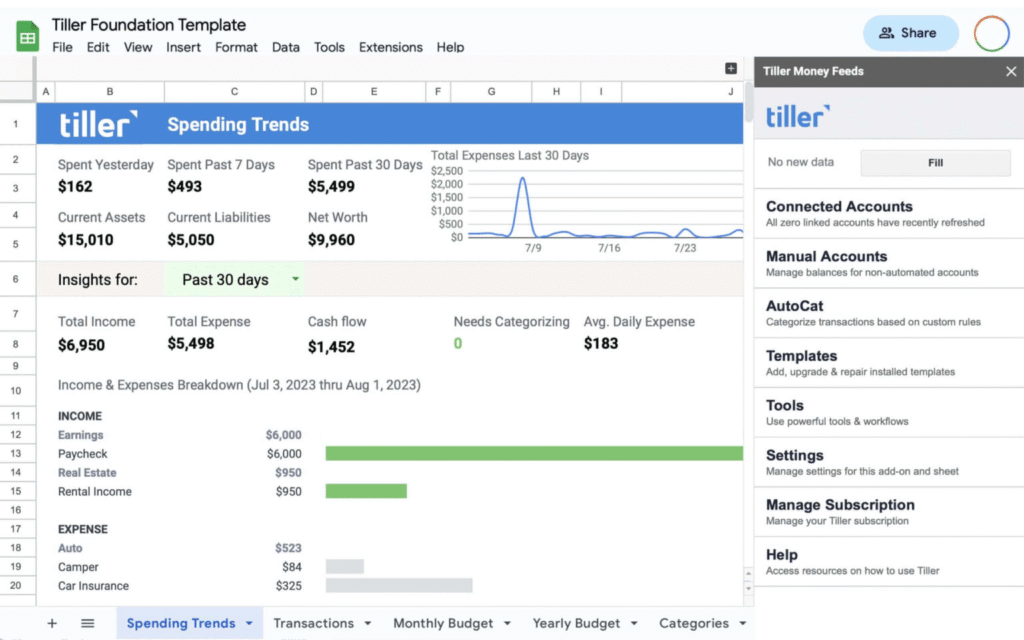
- Foundation Template provides out-of-the-box budgeting, spending trends and net-worth tracking.
- AutoCat lets you create if-then rules that auto-tag new transactions.
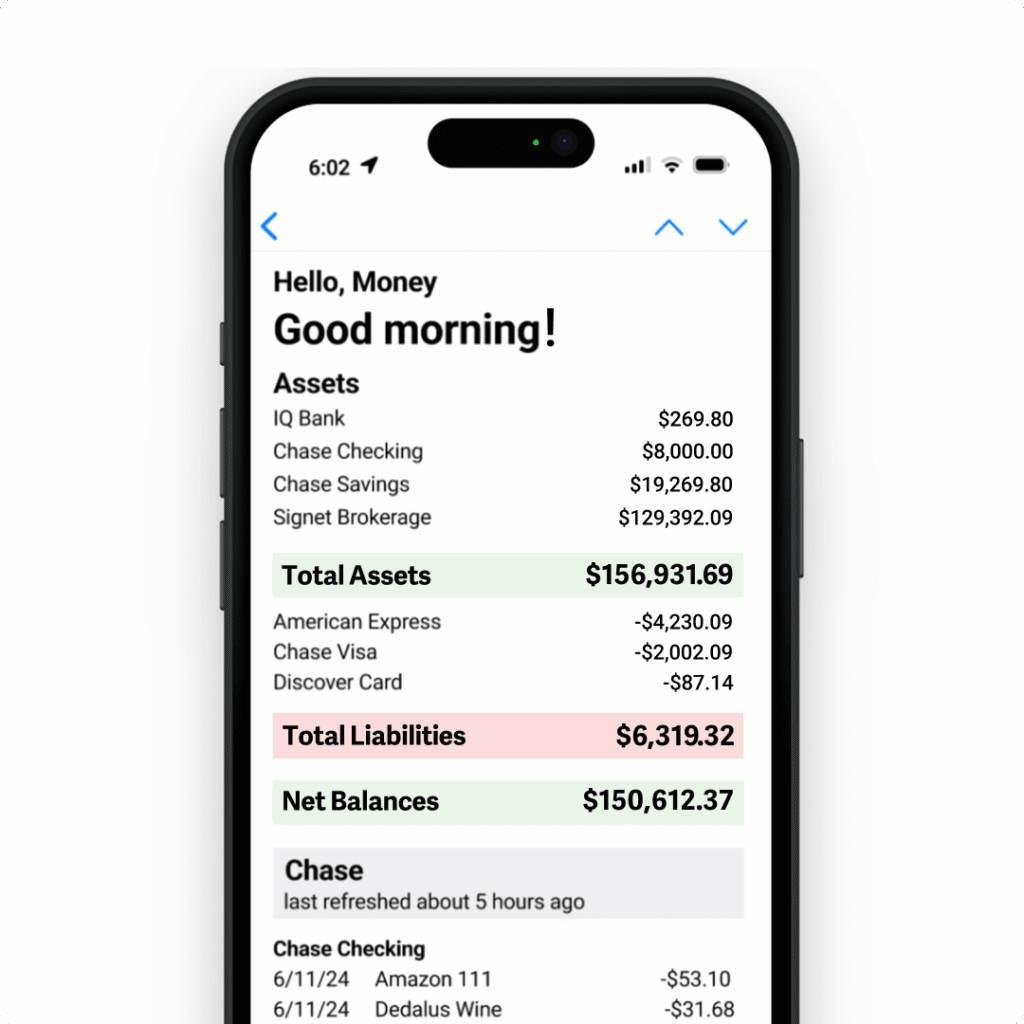
- Optional “Hello Money” email gives you a mobile-friendly daily snapshot.
- Works in Sheets and Excel, plus an active marketplace of community templates.
- Best for spreadsheet enthusiasts who value flexibility and data ownership.

What Sets Tiller Apart
Most budgeting apps lock you into canned reports; Tiller hands you raw, refreshable data in a spreadsheet you already know, so anything Excel or Sheets can do—pivot tables, charts, custom scripts—comes along for the ride.
Tiller Money Feeds : The Data Engine
The Money Feeds add-on links thousands of U.S. financial institutions via secure OAuth, refreshing balances and new transactions up to four times each day—no more CSV exports or copy-paste marathons.
Foundation Template : Ready-Made Budget Dashboard
Start any workbook with the Foundation Template and you’ll get pre-built sheets for categories, monthly budget, yearly cash-flow, spending trends and net-worth—all fully editable because they’re plain spreadsheet tabs.

AutoCat : Rule-Based Categorization
Tired of manually tagging Starbucks and Uber? AutoCat lets you write simple rules such as “Description contains ‘AMAZON’ → Category: Shopping”; new data arrives already labeled, saving hours each month.
Hello Money Email : Daily Snapshot
For quick-glance monitoring, the opt-in Hello Money email summarizes yesterday’s spending and current balances, so you can stay on budget without opening a sheet.
Business & Advanced Templates
Beyond personal budgets, community-built templates add profit-and-loss tracking for freelancers, zero-based budgeting, FIRE progress charts and multi-year forecasting—installable with a couple of clicks.
Security & Privacy Framework
Bank credentials never touch Tiller; the service uses Yodlee and other aggregators for tokenized connections, and you can delete feeds or your entire account at any time for a full data purge.
Integrations with Excel and Google Sheets
A single subscription covers both spreadsheet platforms; switch between Excel (desktop or web) and Sheets without extra cost, ideal for households split between Microsoft and Google ecosystems.
Community Marketplace and Support
An active user forum, weekly webinars, live chat and a growing gallery of community templates mean help and inspiration are never far away.
Pricing & Free Trial
New users get 30 days to kick the tires; after that, Tiller costs a flat $79 per year—about $6.58 a month—with a no-questions-asked refund policy.
Pros and Cons
Pros
- Data lives in your own cloud drive for maximum transparency
- Works in both Sheets and Excel under one plan
- Rule-based AutoCat slashes manual categorization time
- Vibrant community templates extend functionality
- Responsive U.S.-based support desk
Cons
- Spreadsheet interface can feel intimidating if you prefer mobile apps
- Annual fee higher than some free competitors
- No native phone app—mobile access is email or opening the sheet
Conclusion
If you love the flexibility of spreadsheets and want automation without surrendering data ownership, Tiller delivers a rare blend of power, privacy and simplicity. Its suite—Money Feeds, Foundation Template, AutoCat and more—lets do-it-yourself budgeters build exactly the workflows they need while avoiding the bloat of traditional finance software. For spreadsheet enthusiasts, it’s hard to beat.